Quality Profiles
| Service | Supported |
|---|---|
| Sonarr (v4) | |
| Radarr |
# See "Basic Setup" for `service_type` and `instance_name`
service_type:
  instance_name:
    # Quality Profile Configuration
    quality_profiles:
      # Guide-backed profile (name derived from guide)
      - trash_id: 9a0e43cb7a892e3e9c4f2f5c5e0dcf8e

      # Manual configuration
      - name: SD
        reset_unmatched_scores:
          enabled: true
          except:
            - My First CF
            - My Second CF
          except_patterns:
            - "^\\[My\\]"
        upgrade:
          allowed: true
          until_quality: Remux-1080p
          until_score: 456
        min_format_score: 123
        min_upgrade_format_score: 100
        score_set: sqp-1-1080p
        quality_sort: bottom
        qualities:
          - name: Remux-1080p
          - name: Bluray-1080p
            enabled: false
          - name: Bluray-720p
          - name: WEB 720p
            qualities:
              - WEBRip-720p
              - WEBDL-720p
          - name: DVD
Optional. Default: No quality profiles are created or modified
An array of quality profiles that along with any configuration properties that Recyclarr should use
to modify that quality profile. If a quality profile does not exist (by name), Recyclarr will create
it for you. If any properties (qualities, min_format_score, etc) are explicitly provided,
Recyclarr will ensure those values are changed and synced.
If there are values you wish Recyclarr to not touch (so that you may manually edit them yourself, for example), simply omit those properties from your YAML. In general, properties you do not specify indicates that you do not want Recyclarr to modify those values. Exceptions to this rule will be mentioned in the relevant sections below as needed.
name
Conditionally Required. Required if trash_id is not specified.
The name of the quality profile. How this property behaves depends on whether trash_id is
specified:
Without trash_id: The name acts as the profile's identifier. Recyclarr matches profiles by
name, so changing the name here means targeting a different profile entirely (either modifying an
existing one with that name, or creating a new profile).
With trash_id: The trash ID becomes the profile's identifier (tracked in Recyclarr's state).
The name becomes optional and defaults to the guide's recommended name. You can specify a custom
name to override the guide's default, and you can change this name freely without losing the
connection to your existing profile.
The same trash_id can appear multiple times to create profile variants. When it does,
every entry sharing that trash_id must have an explicit name; none may rely on guide name
inheritance. Each name must be distinct. If any entry omits name, Recyclarr reports a validation
error: "Multiple profiles use trash_id 'X'; each must have an explicit 'name' to disambiguate."
trash_id
Optional.
The trash ID of a TRaSH Guide quality profile definition. When specified, Recyclarr automatically syncs configuration from the guide, including:
- Qualities and quality groups
- Score set (
score_set) - Custom formats and their scores
- Language (Radarr only)
This significantly reduces YAML complexity. Instead of manually configuring all properties, specify
the trash_id and let Recyclarr pull the configuration from the guide. The profile name is also
derived from the guide when name is omitted:
quality_profiles:
  - trash_id: 9a0e43cb7a892e3e9c4f2f5c5e0dcf8e
The order of properties within a YAML mapping (such as trash_id, name, upgrade, etc.) does not
matter. YAML treats trash_id first and name first identically. Only the indentation and nesting
affect meaning.
You can override specific properties, including the name. Any property you explicitly specify takes precedence over the guide values:
quality_profiles:
  - trash_id: 9a0e43cb7a892e3e9c4f2f5c5e0dcf8e
    name: My Custom Profile Name   # Override guide's name
    min_format_score: 100          # Override guide's value
The same trash_id can appear multiple times to create variants of a guide profile. Each variant
independently inherits the guide's quality ordering and CF scores, with overrides applied
per-instance:
quality_profiles:
  - trash_id: ca39fe2fec28ae7a6e8779404b614f80
    name: Any
    upgrade:
      allowed: true

  - trash_id: ca39fe2fec28ae7a6e8779404b614f80
    name: Arabic
    upgrade:
      allowed: false
    min_format_score: 100
Both profiles get the same qualities and custom format scores from the guide, but with different upgrade and score settings. See Create profile variants for more examples.
See Renaming a guide-backed quality profile for a complete example.
Use recyclarr list quality-profiles to see all available quality profiles and their trash IDs. See
the CLI reference for details.
reset_unmatched_scores
Optional. Default: do not reset any scores
enabled
Required.
If set to true, custom format scores in this profile are set to 0 if they match any of the
following conditions:
- The custom format is not managed by Recyclarr (not in a
trash_idslist). - The custom format has no score assigned (either manually or sourced from the guide).
Custom formats may be excluded from resets with the except property.
If false, scores are never altered unless it is listed in the trash_ids array and has a valid
score to assign (either from the guide or via an explicit score).
except
Optional. Default: empty; no CFs excluded from reset
A list of one or more custom format names to exclude from score resets. Names must match exactly
(case-sensitive). The typical use case is to exclude custom format scores you manage manually (i.e.
that are not synced by Recyclarr). For pattern-based matching, see
except_patterns.
If neither except nor except_patterns is specified, all CFs are unconditionally reset to 0 as
described by the enabled property documentation.
except_patterns
Optional. Default: empty; no CFs excluded from reset
A list of one or more regular expression patterns used to exclude custom formats from score resets.
Matching is case-insensitive. A custom format is excluded if its name matches any pattern in this
list or any name in except.
This is useful when you manage your own custom formats with a common naming convention. Instead of
adding each CF name individually to except, a single pattern can match all of them.
reset_unmatched_scores:
  enabled: true
  except_patterns:
    - "^\\[My\\]"
The example above excludes any custom format whose name starts with [My] (e.g. [My] Audio Surround, [My] Resolution).
Backslashes require double escaping in quoted YAML strings. YAML interprets \\ as a literal \,
which is then passed to the regex engine. For example, "^\\[My\\]" becomes the regex ^\[My\]. If
you prefer, unquoted strings avoid this: - ^\[My\].
Invalid regex patterns are rejected during configuration validation. Patterns that match zero custom formats in a profile produce a warning.
score_set
Optional. Default: default
A string (name) that determines the guide-provided, preset scores to use across all custom formats assigned to a quality profile. In the TRaSH Guides, a "score set" is a set of scores across multiple custom formats designed for specific types of profiles, such as 1080p vs 2160p.
For example, if you have score_set: anime-radarr, then any custom format assigned to the profile
will use the score assigned to the name "anime-radarr". If any custom format does not have a
score that is a part of that set, it instead pulls the score from the default score set (named
"default"). If score_set is omitted, then all scores are taken from the default score set as
well.
Use the list score-sets command to get a list of available score sets that can be used with this
property. Visit the CLI reference page for more information.
min_format_score
Optional. Default: leave existing value untouched
Correlates directly to the "Minimum Custom Format Score" field in the Quality Profile edit dialog in Radarr/Sonarr.
min_upgrade_format_score
Optional. Default: leave existing value untouched
Correlates directly to the "Minimum Custom Format Score For Upgrades" field in the Quality Profile
edit dialog in Radarr/Sonarr. This controls the minimum custom format score required to upgrade an
already-downloaded release, separate from min_format_score which controls initial downloads.
upgrade
Optional.
Does nothing by itself. A container for the allowed, until_quality and until_score properties.
allowed
Required.
Directly correlates to the "Upgrades Allowed" check box in the Quality Profile edit dialog in
Radarr/Sonarr. If true is provided, the box is checked and false unchecks the box. If you don't
want Recyclarr to manage this checkbox, you need to delete the entire upgrade block (including its
contents).
until_quality
Conditionally Required. Default: leave existing value untouched
Correlates directly to the "Upgrade Until Quality" drop-down / select box in the Quality Profile
edit dialog in Radarr/Sonarr. The quality name mentioned here must exist in the qualities list
(if that list is provided) or be a valid quality in your profile that you've enabled/allowed by
manually editing the profile through the Radarr/Sonarr UI.
This property is required if you also specify a qualities list. If you do not have a qualities
list, this property is optional and will leave your manually set cutoff alone.
until_score
Optional. Default: leave existing value untouched
Correlates directly to the "Upgrade Until Custom Format Score" field in the Quality Profile edit dialog in Radarr/Sonarr.
qualities
Conditionally Required. Default: leave existing qualities untouched
This property is required if the profile is being created for the first time. If the profile already exists, then this property is optional.
A list of qualities and/or quality groups to enable for this quality profile. You also have the option of defining new quality groups using this list.
There are several important things to know about defining qualities:
- Quality groups are defined by having a nested
qualitieslist. - Qualities have fixed names and are defined by the service. The names must match what you see in the qualities list shown when editing a quality profile in the Radarr or Sonarr UI.
- The order in which you list your qualities & groups here will be reflected in the service.
- When defining a quality group, qualities you assign to that group get removed from other groups if needed.
- Existing groups that have qualities removed from them will be retained, unless that group becomes empty as a result, in which case the group is deleted.
The qualities section is a list. Each list item is allowed to have the properties documented in
the following sub-sections.
name
Required.
The name of an existing quality. If this is a quality group, this name identifies either an existing quality group or will be used as the name for a newly created group.
enabled
Optional. Default: true
If this is omitted or set to true, this quality will be allowed. This is the equivalent of
checking the box next to the quality in the Radarr or Sonarr UI. If set to false, this quality
will be disallowed (unchecks the box).
There are two distinct methods of disabling (disallowing) a quality: Either set this property to
false or delete the quality from the list entirely. Make sure you understand the behavioral
impact of both choices! The safest way to disable a quality is to set enabled: false, leave it
in your YAML, and in the exact order it already is. If you remove a quality to disable it, make sure
you understand the consequences.
qualities
Optional. Default: Treat this as a quality
A list of one or more strings that identify existing qualities to bundle into a group. By
specifying this list, you are implicitly enabling this quality item to be a group and not a
quality by itself. The name property becomes the name of this group. If the group does not exist,
it will be created.
quality_sort
Optional. Default: top
Determines the sorting order of qualities. The sorting order affects search results and cutoff
processing in Radarr & Sonarr v4. Valid values are top and bottom, explained in detail below.
Regardless of the sorting mode, the order of the qualities you explicitly specify will always be
in the order in which they appear in the qualities section.
Why Order Matters
It's important to know that even when a quality is disabled in your quality profile, its order still matters for the following reasons:
- Manual search results, by default, are sorted based on the order of the qualities in your quality profile.
- Whether a cutoff is met or not is still impacted by disabled qualities.
Because disabled (disallowed) qualities are not technically non-functional, the sort mode exists to
give you some flexibility in how those disabled qualities impact you when they're missing from the
qualities list in your configuration YAML.
Top Sort
When quality_sort is set to top (which is also the default if you do not specify this
property), qualities and groups you explicitly specify in your YAML are sorted to the top of the
list. Unspecified qualities appear at the bottom.
If qualities are removed instead of disabled, this can cause unwanted downgrades of movie files.
Example
Click to Expand Example
quality_sort: top
qualities:
  - name: Remux-1080p
  - name: Bluray-1080p
    enabled: false
  - name: Bluray-720p
  - name: WEB 720p
    qualities:
      - WEBRip-720p
      - WEBDL-720p
  - name: DVD
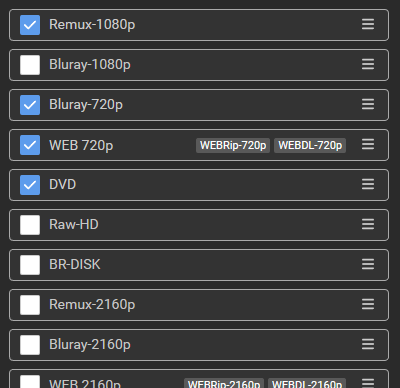
When you sync this quality profile, it will look like this when you view it in the Radarr UI:
Bottom Sort
When quality_sort is set to bottom, qualities and groups you explicitly specify in your YAML
are sorted to the bottom of the list. Unspecified qualities appear at the top.
If qualities are removed instead of disabled, this can result in upgrades never happening.
Example
Click to Expand Example
Using the same example YAML from the previous section:
quality_sort: bottom
qualities:
  - name: Remux-1080p
  - name: Bluray-1080p
    enabled: false
  - name: Bluray-720p
  - name: WEB 720p
    qualities:
      - WEBRip-720p
      - WEBDL-720p
  - name: DVD
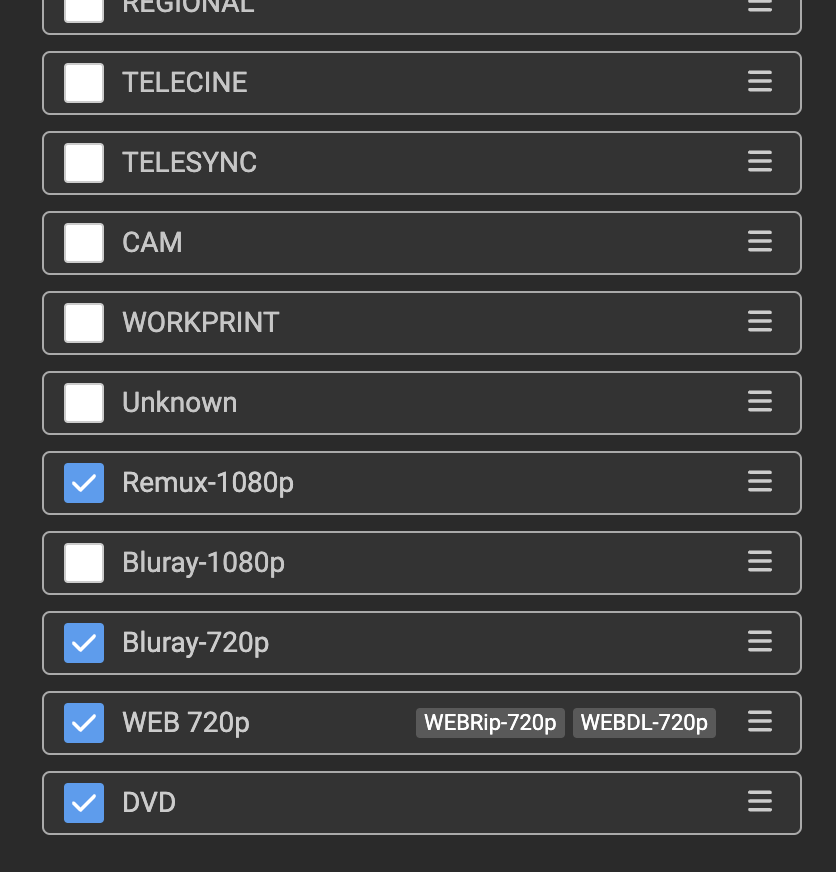
Syncing this will yield the following qualities list when you view them from the Radarr UI:
Limitations
This section covers features with partial support or known constraints.
Language
For guide-backed Radarr profiles, language settings from guide resources sync automatically. Sonarr quality profiles do not have a language field; use custom formats for language filtering instead.
Manual configuration of language via YAML is not yet supported. The language value from the guide passes through automatically and cannot be overridden.
Renaming Profile Variants
When multiple profiles share a trash_id, at most one may be renamed per sync. Recyclarr uses a
two-pass algorithm to match profiles to their existing state, and multiple simultaneous changes
create ambiguity it cannot resolve. Operations that require multiple syncs:
- Rename 2+ profiles sharing a
trash_idsimultaneously - Rename one profile and add a new profile with the same
trash_idsimultaneously - Remove one profile and rename another with the same
trash_idsimultaneously
In each case, perform the first change, sync, then perform the second change and sync again.
Validation
Two profiles cannot resolve to the same name regardless of trash_id. If a name collision is
detected, all entries with that name are skipped with an error.
When a trash_id appears two or more times (creating profile variants), every entry
sharing that trash_id must specify an explicit name. Omitting name on any variant
produces a validation error. Each variant name must also be distinct.